Build with your own agent
Pilot
Connect Claude, Claude Code, Cursor, ChatGPT or VS Code to a Qaldy workspace over MCP. The agent looks at apps and runs, plans a build, and a person approves it.
You keep your own tools. Claude, Claude Code, Cursor, ChatGPT and VS Code connect to Qaldy over the Model Context Protocol (MCP), look at the workspace's apps, runs and data, plan a build, read a failed run down to the refused call, and build into a workspace that the client owns. Everything that changes something waits for a person.
The server is hosted at https://mcp.qaldy.com/mcp and is a Pilot. It speaks the Streamable HTTP transport and signs people in with OAuth 2.1.
Connect in one minute#
Pick your client. Each page shows exactly what to paste or press, and what you should see. These pictures are of Qaldy's own screens. The menus of Claude, Cursor, ChatGPT and VS Code change often, so those are described in words rather than pictured.
/mcp.CursorA line in mcp.json, then the sign-in button.ChatGPTA connector in developer mode, with OAuth.VS CodeA server entry in .vscode/mcp.json.Tokens, CI and scriptsA personal access token for clients that cannot open a browser.Automations as toolsLet your colleagues' agents call an automation you chose. PreviewNews for your agentHear when a run fails or an approval waits. Preview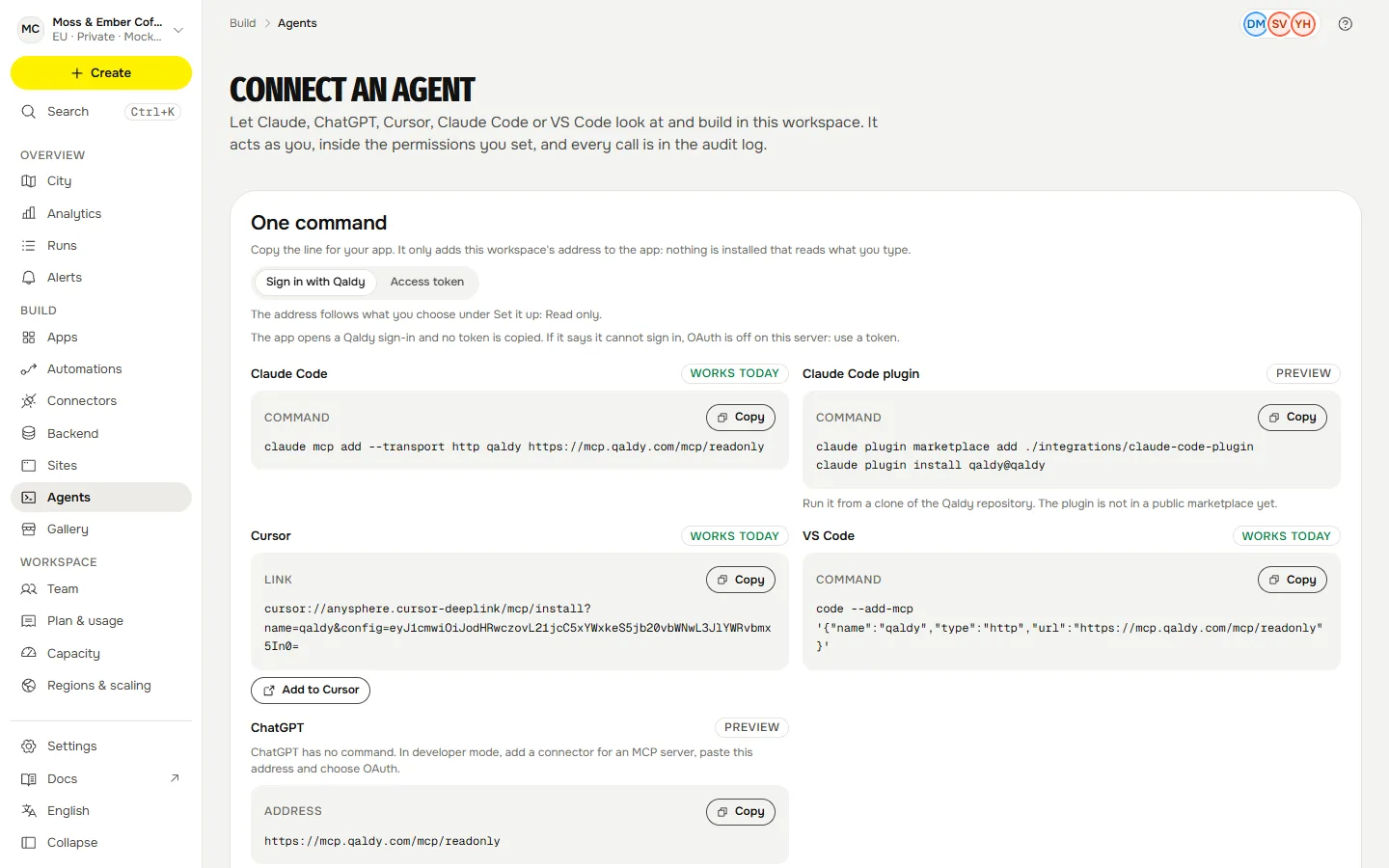
What you get#
A workspace is the unit. An agent works in one workspace per connection, as you, with the scopes you gave it.
- Look:
list_apps,get_app,list_runs,explain_run,inspect_run,list_attention,workspace_analytics,query_table,list_connectors,list_approvals. - Plan and change:
plan_app_from_prompt,update_app,rollback_app,import_workflow,estimate_cost,list_templates. These plan first and show every permission as a sentence.import_workflowreads an n8n, Zapier or Make export and leaves the result switched off for a person to review (Preview). - Act, with a person's confirmation:
approve_build,decide_approval,run_app,share_app,insert_rows. - Docs:
search_docssearches these pages without a sign-in. - Your own automations: the ones your colleagues choose to publish appear as tools too. See Automations as tools.
All 29 tools, with their inputs, are on Tools.
Read-only and narrower connections#
Add /readonly to the address for a connection that can never change anything: https://mcp.qaldy.com/mcp/readonly. Tools that are not offered are not registered, so a read-only agent cannot call a write tool, even by being talked into it.
?features= narrows a connection to the groups it needs: build, runs, share, tables, permissions, docs. For example https://mcp.qaldy.com/mcp?features=runs,docs. The two combine: https://mcp.qaldy.com/mcp/readonly?features=runs.
One line from the console#
The console's Connect an agent page shows one line for each app, with this workspace's address in it, and a switch between signing in with Qaldy and an access token. The lines only register the address: nothing is installed that reads what you type. Where the server cannot offer sign-in (OAuth is off on it), the page says so and the token lines are the way.
Finding the server#
- Server card.
https://mcp.qaldy.com/mcp/server-cardis a public JSON document with the server's name (com.qaldy/cloud), version, endpoints, the protocol versions it speaks and how to sign in. It leaves out tools and capabilities on purpose, because they depend on who is signed in, and carries no credential and no person's data. - Skills over MCP. The four workflows below are also served as resources (
skill://qaldy-build/SKILL.mdand so on, plusskill://qaldy/SKILL.md, an overview) for hosts that load skills over MCP. The Skills extension's own methods are Planned. - The MCP registry lists servers by a reverse-domain name; Qaldy's would be
com.qaldy/cloud. Listing it needs a DNS record on the company's main domain that has not been added yet, so it is Planned. Today you add the address by hand or from the console's lines.
Two ways to sign in#
- Sign in with Qaldy is for people. The client opens a browser, you pick the workspace and whether the agent may only read or may read and write, and nothing is copied. Access tokens last an hour and refresh by themselves. The Apps signed in list on the Agents page shows every connection, when it last called, and ends any of them at once.
- A personal access token is for CI, scripts and clients that cannot open a browser. See Tokens, CI and scripts.
How an agent stays safe#
Read How an agent stays safe before you give one write access. The short version: the agent acts as you and never as more, a token works in one workspace, anything that widens what an app can reach is approved by a person in the console, every call is an audit row, and text from rows, logs and run errors is handed to the model as data.