Where your data lives
Preview
The printable statement of where a workspace's data lives, who processes it, what is backed up and for how long, and what the statement does not claim. Generated from the same registry the console reads.
Your auditor, your customer or your lawyer asks: where is the data, who touches it, and what happens to a backup? Where your data lives is the answer for one workspace, on one page, in Russian, Kazakh or English.
Get it#
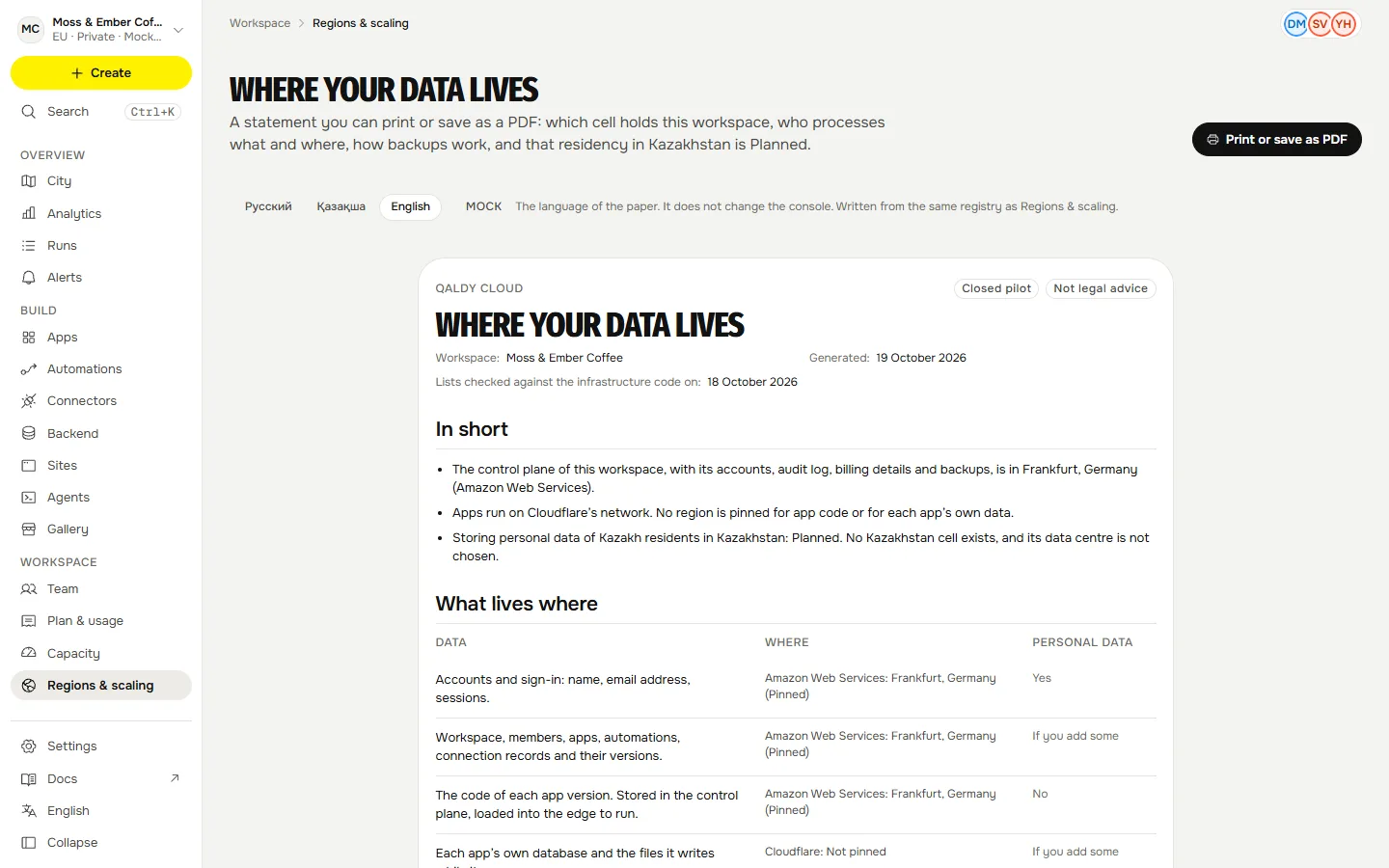
In the console, open Regions & scaling and choose Where your data lives, or go straight to /infrastructure/residency. Pick the language of the paper, then Print or save as PDF. Over the API it is GET /v1/workspaces/{ws}/residency. It names your workspace and its data policy, the cell that holds it today, and, separately, the cell you asked for and whether it exists.
What it says about residency#
Storing personal data of Kazakh residents in Kazakhstan: Planned. No Kazakhstan cell exists, and its data centre is not chosen. That is the sentence the statement carries, and the console and the landing page say the same. If a workspace asked for a Kazakhstan cell, the statement says which cell it asked for and that it is not available.
Who processes data#
| Who | What it does for Qaldy | What data it handles | Where | When |
|---|---|---|---|---|
| Cloudflare (US) | Runs every app in isolates at the edge, stores each app’s own database, and carries traffic to the console and the API. | App code while it runs, each app’s own data, requests and responses, request logs. | Cloudflare’s global network. No region is pinned: Cloudflare places an app’s database near where it is first used, and a request runs near the visitor. That is speed, not residency. | Always: it runs the apps and carries traffic |
| Amazon Web Services (US) | Hosts the control plane: the API, the database, the gate, keys and backups, in one cell. | Accounts, workspaces, app manifests and versions, run records, the audit log, billing details, sealed connector keys, backups. | Frankfurt, Germany (eu-central-1). Pinned. | Always: it holds the control plane |
| Anthropic (US) | The model behind “describe it and it builds”. | The sentence you type, the plan and the code the model writes. Not your app’s data and not your keys. | Anthropic’s API. Qaldy does not pin a region; Anthropic chooses where the model runs. | When the builder calls a model, if the install has it switched on |
| Resend (US) | Sends sign-in codes and notices from login@mail.qaldy.com. | Recipient email addresses and the text of each message. | Resend decides where a message is processed. The sending domain mail.qaldy.com is set to the Ireland region (eu-west-1). | When Qaldy sends a sign-in code or a notice by email |
| Google (US) | Sign in with Google, for people who choose it. | Name, email address and profile picture, sent to Qaldy when a person signs in. | Google decides. Used only when a person picks Sign in with Google. | Only when a person chooses Sign in with Google |
Not in the data path: Vercel (hosts the public landing page; no workspace data); GitHub (holds the source code and runs deployments; no workspace data).
In the console, a provider that this install has switched off is shown as not used: not hidden, and never counted as processing your data.
What lives where#
| What | Who holds it | Where | Personal data? |
|---|---|---|---|
| Accounts and sign-in: name, email address, sessions. | Amazon Web Services | Frankfurt, DE (aws-eu-central-1) | Yes |
| Workspace, members, apps, automations, connection records and their versions. | Amazon Web Services | Frankfurt, DE (aws-eu-central-1) | If you put some there |
| The code of each app version. Stored in the control plane, loaded into the edge to run. | Amazon Web Services | Frankfurt, DE (aws-eu-central-1) | No |
| Each app’s own database and the files it writes while it runs. | Cloudflare | Not pinned: the provider chooses | If you put some there |
| Connection keys: sealed to the gate, stored as ciphertext, opened in memory for one call. | Amazon Web Services | Frankfurt, DE (aws-eu-central-1) | No |
| The hash-chained audit log: who did what, when, to which object. | Amazon Web Services | Frankfurt, DE (aws-eu-central-1) | Yes |
| Run records: start, end, status and the steps the gate saw. Not the app’s payloads. | Amazon Web Services | Frankfurt, DE (aws-eu-central-1) | If you put some there |
| Billing details you enter: company name, BIN or IIN, address, and the invoices made from them. | Amazon Web Services | Frankfurt, DE (aws-eu-central-1) | If you put some there |
| What you ask the builder for, and what it writes back. | Anthropic | Not pinned: the provider chooses | If you put some there |
| Sign-in codes and notices sent to your members. | Resend | Not pinned: the provider chooses | Yes |
Cloudflare's edge is speed, not residency: a request runs near the visitor, and an app's own database sits near where it was first used. The statement says so rather than naming a country for it.
Backups#
| Copy | Kept for | A restore button today? |
|---|---|---|
| Automated database backups with point-in-time restore, encrypted, in the same region as the database. | 7 days | No |
| A nightly database dump written to a locked bucket: nobody, including the API, can delete it before the lock ends. | 35 days | No |
| App data keeps Cloudflare’s point-in-time recovery for Durable Object storage. Qaldy has no restore button for it yet. | Set by the provider | No |
None of these has a restore button today. They exist so that Qaldy can recover from a bad day, and the statement does not promise a restore that you can start yourself.
What the statement does not claim#
- Kazakhstan residency. It is Planned; there is no Kazakhstan cell today.
- That the Cloudflare edge keeps data in a country. It is speed, not residency.
- Legal advice. Whether your use needs data kept in Kazakhstan is a question for your counsel.
- An independent audit report. Qaldy has none yet; each provider publishes its own.
When it changes#
The statement is generated, so it follows the registry. When a cell, a provider or a backup period changes, the date at the top of this page and the one on the statement change with it. A Kazakhstan cell will first appear on this page as a decision, with the provider and a date, before it appears as a place.