The exposure check before a public link
Beta
Before an app can be opened by anyone with a link, Qaldy questions a throwaway copy the way a stranger would. What it asks, what blocks a public link, and what it cannot find.
Most apps never need a public link: people open them behind your company login. A form or a booking page sometimes does. That is the moment an app stops being something only your people can reach, so Qaldy checks it first.
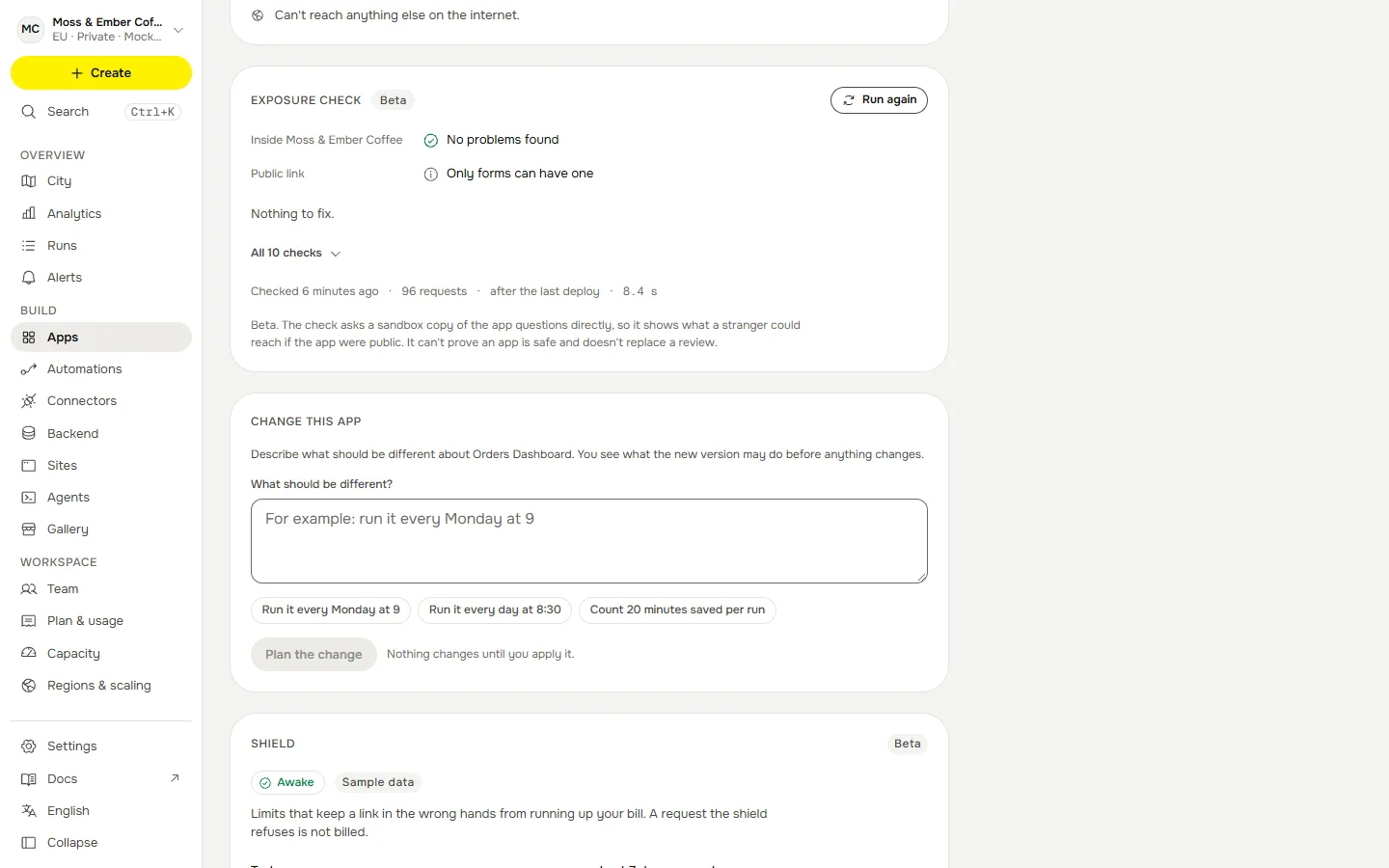
The exposure check loads a throwaway copy of the app in a sandbox and asks it questions the way a stranger would: with no sign-in, as the lowest role, with hostile text and with huge input. What came back is judged by fixed rules. It takes about 20 seconds.
Where you see it#
Open the app and look for Exposure check. Run the check starts it (owners and editors only; anyone who can view the app can read the result). It also runs by itself after a deploy and from the share dialog. Under Public link in the share dialog you see why a link is ready or not.
What it asks#
| Check | What it does |
|---|---|
| Sign-in is required | Opens every route it can find with no sign-in, and as the lowest role (viewer), and compares the answer with the owner’s. |
| No records without sign-in | Plants a marker record in the throwaway copy’s database and looks for it in answers to a stranger. |
| No secrets or tokens in answers | Sends fake credentials and looks for them in the answer; looks for the shape of real keys, and for stack traces and file paths. |
| No open cross-site access | Asks the way another website would, and flags answers that let any site read them, or read them with the visitor’s sign-in. |
| Safe browser headers | Looks for a Content-Security-Policy, content-type protection and framing protection on pages. |
| Common injection attempts fail | Puts hostile text in every query name and form field and looks for SQL errors, reflected script and server errors. |
| Undeclared hosts stay blocked | Checks that an address the app never declared stays blocked. |
| Oversized input is handled | Sends very large input and checks that the app refuses it instead of failing. |
| No writes without sign-in | Tries to write with no sign-in and flags a write that is accepted. |
| Only declared tables | Checks that the tables the code uses are the tables the manifest declares, and that none uses a reserved name. |
Each finding says which route, what happened and how to fix it, in plain words. Copy for your coding agent puts the findings on the clipboard in a form an agent can act on.
What decides#
| Result | Meaning |
|---|---|
| Blocked | At least one high finding: for example records came back to someone who was not signed in, or an answer held something shaped like a secret. A public link cannot be turned on. |
| Review | At least one medium finding, such as a page that lets any website read its answers. A person should look. |
| Clear | Nothing that stops a public link. |
For a link to be turned on, the check must have finished on the current version, and it must be less than 24 hours old. If the app changed, or the last check is older, run it again. If the check could not run, a public link waits: nothing is guessed. A sample app with no code has nothing to ask and passes, but the typed confirmation below still applies.
Turning on Anyone with the link then asks you to type the app's name. Capital letters do not matter. Only an admin can turn it on, and only for apps whose workspace policy allows it.
It also moves the Trust Score#
The result is folded into the Trust Score as a report-only check, Exposure probe passes. A high finding keeps the score below the publish line, and a medium finding keeps it in Review until a person has looked. No check, a skipped one or one that could not run changes nothing.
What it cannot find#
It is a black-box check of what an app answers, not a review of its code and not a penetration test. It finds the common, expensive mistakes: a route that forgot to ask who you are, an admin page a viewer can open, a stack trace in an error, a wildcard CORS header. It does not find a flaw it has no route to, a mistake in the app's logic that looks fine from outside, or anything about the platform beneath the app (the gate and the sandbox are what stand there). Passing it means "nothing it tried got through", and nothing stronger.
Over the API and in the log#
GET /v1/apps/{id}/probe returns the last check of the current version and whether a public link may open; POST on the same path runs it again (an owner or editor; one manual run every 30 seconds per app). Running it is an audit row. See Share it for the rest of sharing.