Spending cap, budgets and the shield
Beta
How the hard spending cap stops apps, runs and builds instead of letting a bill grow, how to set a budget for one app or person, and how the shield keeps a shared link from running up a bill.
A tool that can run all night should not be able to spend all night. Qaldy holds the workspace's spending cap where the work happens: at the gate in front of apps, in the runtime host that runs them, in the API that starts runs and builds, and in the Backend data API. This page says what stops, how fast, what you can set, and what is not true yet.
What is held#
Three allowances are held (the plan's, plus any capacity you added, with a 10 percent grace) while the workspace's hard cap is on. With the hard cap off nothing is held; the alerts still go out.
| Allowance | When it is used up | What stops |
|---|---|---|
| App requests | Apps sleep behind a calm page (HTTP 503 with Retry-After) | Requests to apps at the gate and the runtime host, and calls to the Backend data API |
| Runs | New runs wait, up to 24 hours | Automations, webhooks, schedules and Run now |
| AI credits | New AI-assisted builds pause | Builds that call the model. Templates still install |
Nothing else is held. CPU time, data out and storage are estimates or not measured, and the console says so.
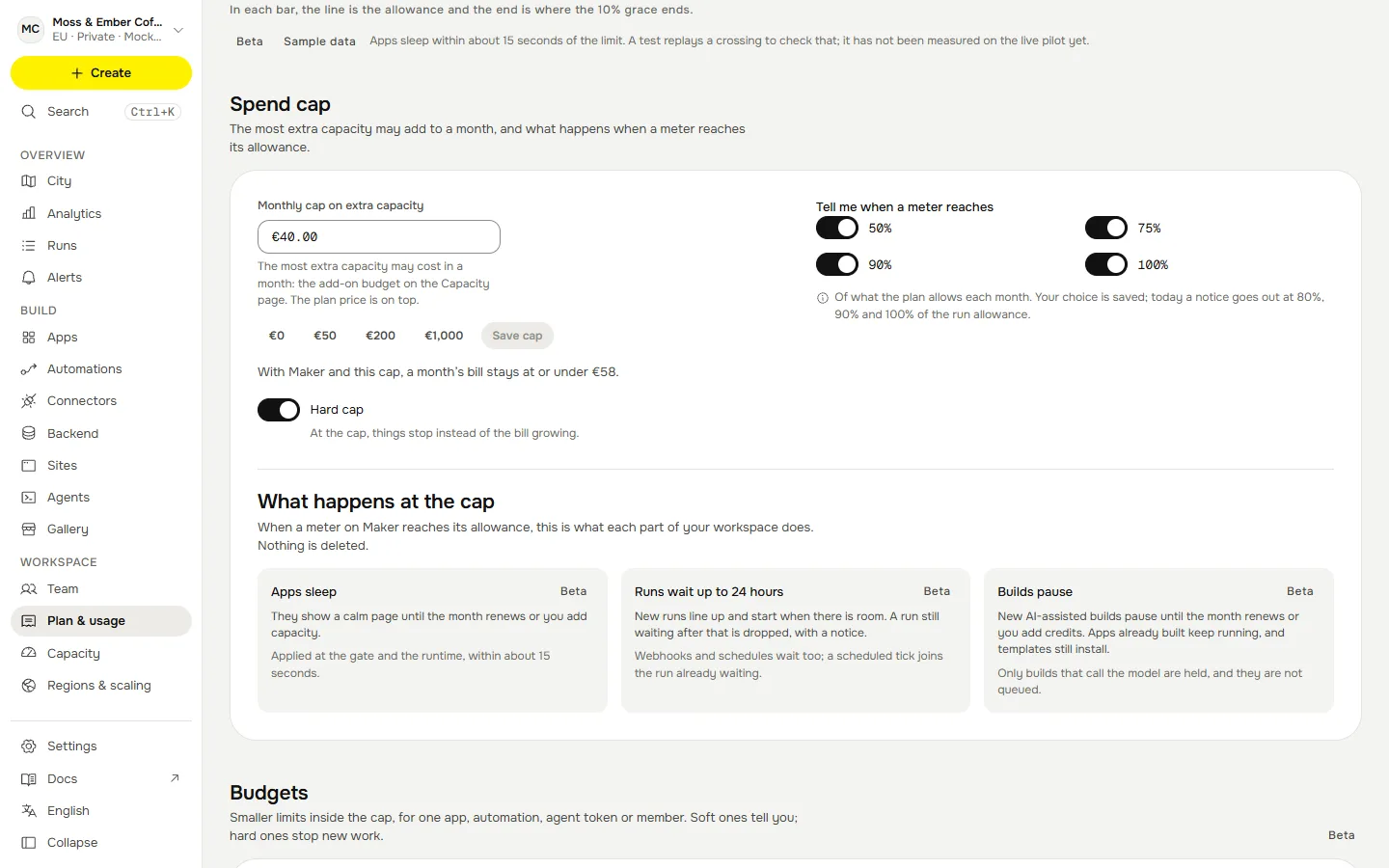
Raising the cap, adding capacity or the month turning over releases a hold. The next check (within about 15 seconds) wakes apps and starts the runs that were waiting, oldest first.
How fast#
The API checks every 10 seconds and whenever it hears news. It signs a small state for each workspace and pushes it to the gate; the gate reports what it served every 5 seconds and counts down a lease between reports, so the cap holds in the seconds before the next report. Each runtime-host isolate refreshes its own view every 5 seconds. The product therefore says about 15 seconds, and a test replays a crossing against those numbers and fails if the worst case is longer. It is a replay, not a measurement on the pilot.
A hold survives an outage. If the API is unreachable the gate and the runtime host keep the last signed state, so a workspace over its cap stays asleep. See When the control plane is down.
Runs that wait#
A run that cannot start because the runs allowance is used up is not dropped. It waits, up to 24 hours:
- When room appears (the month renews, or the owner adds runs) waiting runs start oldest first. At the deadline a run is dropped and the owner is told.
- One scheduled run per app and schedule waits at a time. A schedule that fires every minute during a long hold would otherwise fill the queue with the same work; later ticks join the one waiting and the console counts them as folded.
- Webhooks and Run now each keep their own run.
- A workspace may keep 1,000 runs waiting. Past that the sender gets
429 queue_full. - Starting a run over the API answers
{ runId, held? };held: truemeans it is waiting, not running.
Budgets#
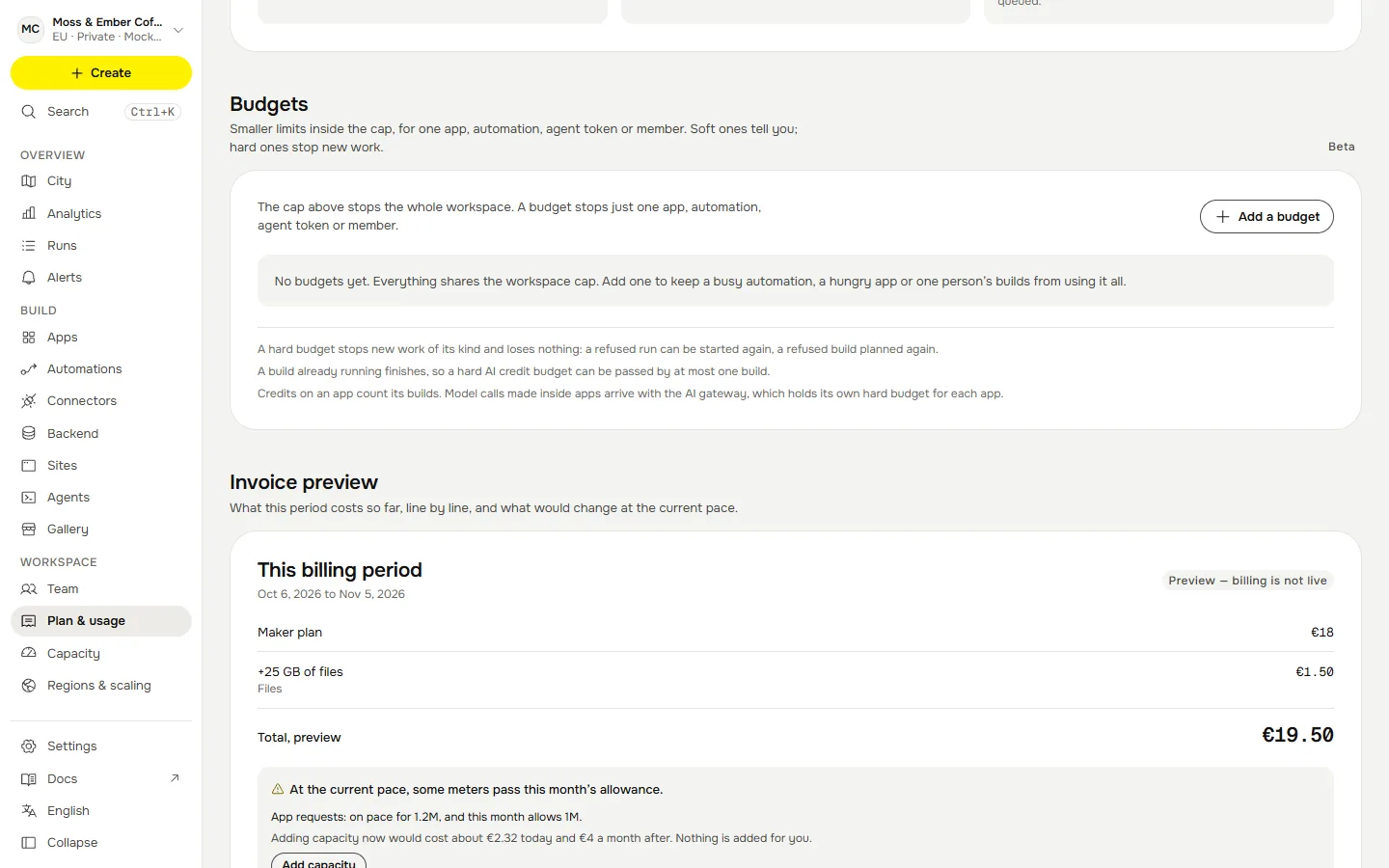
The workspace cap is one promise. A budget is a smaller one inside it: "this app may use at most N runs a month", "this agent token may spend at most N AI credits". Open Plan and usage, then Budgets, and choose Add a budget.
- Soft: tell me. Never stops anything. It tells the owners at 50, 75, 90 and 100 percent, once per level per month.
- Hard: stop. Stops the work when the limit is reached. Nothing is lost: a refused run can be started again, and a refused build can be planned again next month or after a raise.
- One credit is one US cent of model use.
| Budget for | Counts | Today | A hard budget… |
|---|---|---|---|
| An app | Runs a month | Enforced | Stops new runs once the month’s runs are used. |
| An automation | Runs a month | Enforced | Stops new runs once the month’s runs are used. |
| An app | AI credits a month | Preview: counted only | Nothing stops yet. The use is counted and the owners are told. |
| A member | AI credits a month | Enforced | Stops new AI-assisted builds once the credits are used. |
| An agent token | AI credits a month | Enforced | Stops new AI-assisted builds once the credits are used. |
A pair that is not in the table cannot be created, because nothing in Qaldy attributes runs to a person or a token, and an automation has no AI spend of its own. An app's own AI budget in the table is counted and alerted but does not stop work; the AI gateway holds its own hard budget per app.
The shield#
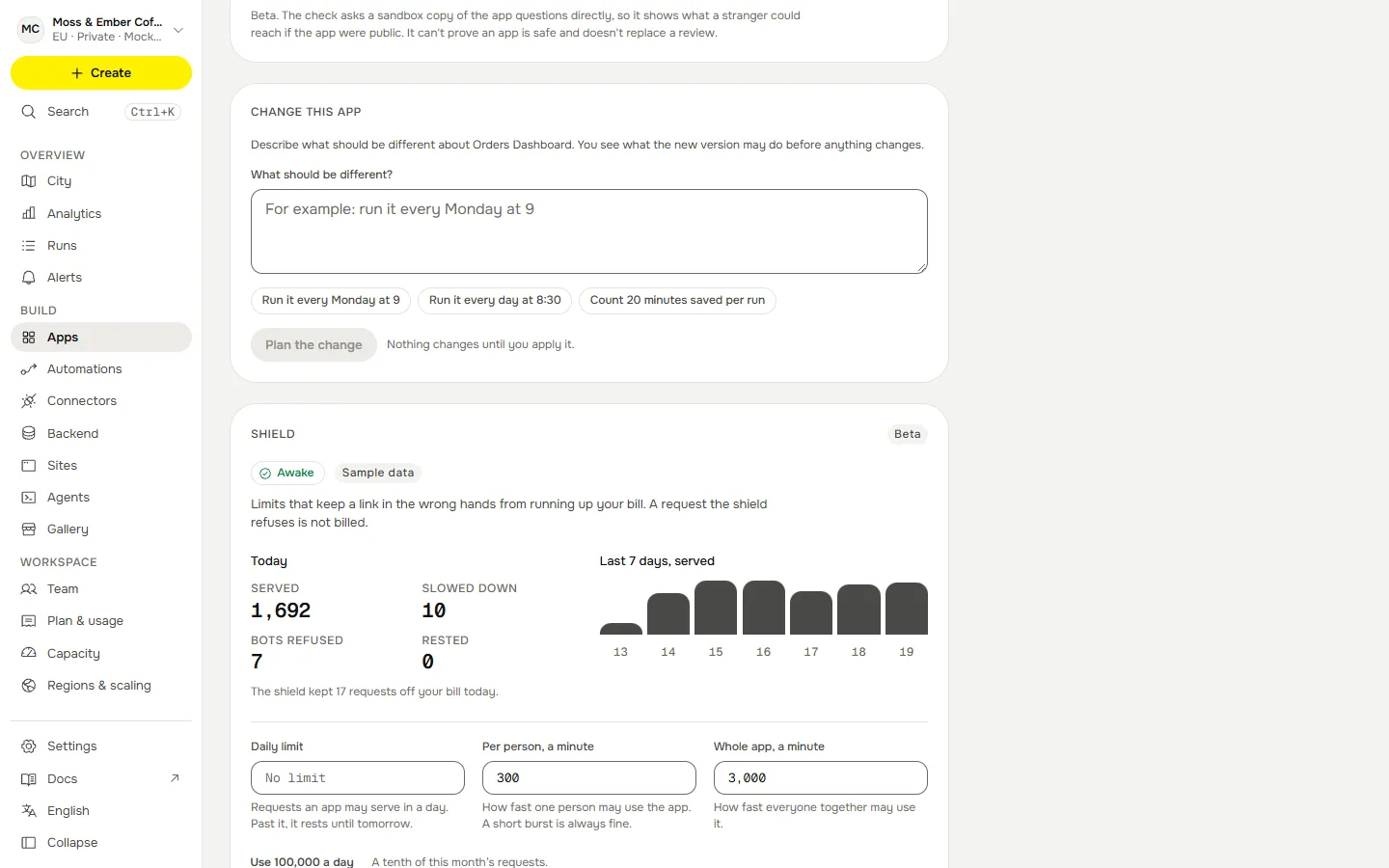
For apps that other people can open, so that a link in the wrong hands cannot run up a bill. It lives in the gate, in memory, and a request the shield refuses is not billed. Each app has its own settings, on its page under Shield:
| Setting | Default | Allowed | What it does |
|---|---|---|---|
| Per person, a minute | 300 | 10 to 6,000 | One person’s sustained rate on one app. A short burst is always fine. |
| Whole app, a minute | 3,000 | 60 to 120,000 | Everybody’s sustained rate on one app. |
| Daily limit | None | 100 to 1,000,000,000 | Requests the app may serve in the workspace’s day. Past it the app rests until tomorrow. |
| Refuse crawlers and scripts | On | On or off | Search engines, AI fetchers, and clients that send nothing a browser sends. |
| Sleep under attack | On | On or off | A flood puts the app to sleep for a few minutes and tells its owners. |
- Who counts as a visitor. Three buckets per request: the signed-in person, the network address (allowed three people's worth, for one address with many accounts) and the whole app. An IPv6 address counts as its /64. The real address is read from the proxy header only when the connection itself arrives from a private address (the tunnel), never from a public one, so it cannot be forged from the internet.
- Bots. Judged from headers only. There is no third-party captcha. Known crawlers are refused, script libraries get a quarter of the budget, and a visitor that keeps drawing 4xx answers (probing) is slowed for five minutes.
- A flood. When the gate refuses a large number of requests in ten seconds it puts the app to sleep itself for a minute and reports it. The API keeps it asleep for 10 minutes and emails the workspace's owners and admins. A stranger sees the same calm page as for the cap, with the reason.
- The daily limit is counted by the gate and confirmed by the API. An app resting for its daily limit cannot be woken by hand; raise the limit and it wakes within seconds.
Who is told#
Email, to the workspace's owners and admins (at most five addresses, owners first): the cap at 50, 75, 90 and 100 percent of each allowance (once per allowance and month, and only the levels switched on), apps asleep or awake, runs held, released or dropped, builds paused or resumed, an attack, a daily limit reached. Telegram and signed-webhook alerts for the cap are Planned.
Every change and every flip is a row in the audit log, with ids and numbers only: apps put to sleep and woken, runs held and released, builds paused, alerts, daily limits, shield changes. A hold also shows in the City as a quota event.
What is not true yet#
- No live timing. The 15 seconds is a design number with a replay test.
- One gate process. The shield keeps its counts in the gate's memory. With more than one gate each keeps its own buckets, so a limit is per gate until a shared limiter exists. The pilot runs one.
- AI gateway. AI credits are held when a build starts. A model call an app makes through the AI gateway on the workspace's own key is not cut off by the workspace cap yet; the gateway's per-app budgets still apply.
- No load test. Nobody has thrown traffic at a shared link on the pilot to see the shield work.
- Telegram and webhook alerts for the cap are Planned.