The qaldy command line
Preview
Install the qaldy command line, sign in with a short code, and build, run and inspect a workspace from a terminal, CI or a coding agent. Preview, talking to the pilot.
qaldy is the terminal front door to a Qaldy Cloud workspace: sign in, look around, build with a plan you read first, run and inspect, read tables, make a token for CI, connect a coding agent. It does what the MCP tools do, for people at a prompt, scripts and CI, and every command prints JSON on request so an agent can use it.
Install#
You need Node 20 or newer. It is one file with no runtime dependencies, no telemetry and no update check.
# Until it is published to npm, the console hosts the package it was built with:
npm install -g https://app.qaldy.com/cli/qaldy-cli.tgz

# Or run it without installing:
npx --yes --package=https://app.qaldy.com/cli/qaldy-cli.tgz qaldy login
The checksum is at https://app.qaldy.com/cli/qaldy-cli.tgz.sha256. Once the package is on npm it will be npm install -g @qaldy/cli.
Sign in#
qaldy login                 # opens the console: check the code, pick the workspace, approve
qaldy login --read-only     # ask for a read-only token
qaldy login --no-browser    # print the link instead (SSH sessions)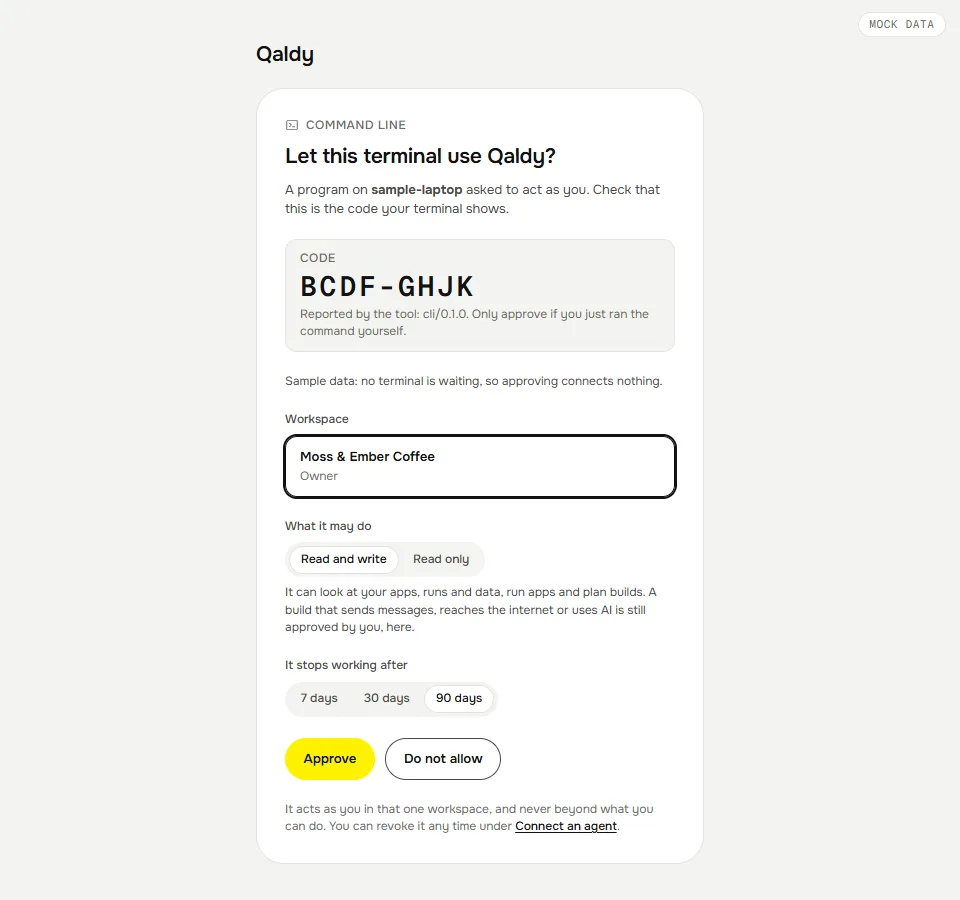
login uses a device code, like gh auth login. The CLI asks for a short code and a link, shows both, and waits. In the console you check that the code matches, pick the workspace, choose Read and write or Read only and a lifetime (never more than the CLI asked for), and approve. The next poll hands the CLI a personal access token, once. It is saved in your user config folder, readable only by you, and acts as you in that one workspace.
- One token, one workspace, one person. Run
qaldy loginagain for another workspace;qaldy workspaceslists the saved sign-ins andqaldy workspaces use <slug>switches. - Where it is kept:
%APPDATA%\qaldyon Windows,~/Library/Application Support/qaldyon macOS,$XDG_CONFIG_HOME/qaldyor~/.config/qaldyon Linux.qaldy doctorchecks the files and their permissions. qaldy logoutrevokes the token on the server and deletes it here.- The CLI refuses an API address that is not
https://(exceptlocalhost), and never sends a saved token to a different API address than the one it was made for.
First five commands#
qaldy whoami                       # who and where
qaldy apps                         # the apps you can open
qaldy runs --status failed         # what broke
qaldy runs inspect <run>           # steps, refused calls, what to do
qaldy build "Alert me in Telegram when coffee beans drop below 5 kg" --plan
build --plan stops after the plan, prints every permission as a sentence, and remembers the plan for an hour on this machine. qaldy approve <build-id> builds exactly that plan after you have read it. All commands are on Commands.
Building from a sentence#
qaldy build "Alert me in Telegram when coffee beans drop below 5 kg"Qaldy plans the app and lists every permission as a plain sentence: what it can read, which connector it can use for what, which domains it can reach, whether it uses AI. In a terminal you are asked to approve; it then waits for the build and prints the app's address. --yes approves without asking.
Over a token, an approval is limited exactly as it is for MCP: the plan is approved unchanged, and only if it is in the safe band. An app that sends messages through a connector, reaches the internet, uses AI, starts shared, or has a webhook or form trigger is approved by a person in the console. The CLI says so, prints the link, and --yes does not get around it (approval_needs_console, exit 1).
Output and exit codes#
- A terminal gets aligned tables, colour that follows
NO_COLOR,--no-colorandFORCE_COLOR, and every status as an icon and a word. A pipe gets the same text without colour. --jsonon every command. Standard output holds exactly one JSON document (logs --follow --jsonwrites one object per line). Anything meant for a person, such as the sign-in code and progress, goes to standard error;--quietsilences it.QALDY_JSON=1is the same as--json.- Failures are
{"error":{"code","message","hint","status"}}on standard output with--json, andError: …plus the hint on standard error otherwise. Codes are the API's own (token_revoked,console_only,insufficient_scope) or the CLI's (not_signed_in,app_not_found,login_denied,planned).
| Exit | Meaning |
|---|---|
| 0 | Done. (apps run --wait also needs the run to succeed.) |
| 1 | The command ran and failed: the API said no, a run failed, a file could not be written. |
| 2 | The command line is wrong: an unknown command or flag, a missing argument. |
| 3 | Not signed in, or the token is revoked, expired or lacks the scope. Run qaldy login. |
| 4 | Planned: not built yet (qaldy deploy). |
| 130 | Stopped with Ctrl-C. |
Environment#
| Variable | What |
|---|---|
QALDY_TOKEN | A personal access token, used instead of a saved sign-in (CI, agents) |
QALDY_API_URL | The API (default https://cloud-api.qaldy.com); --api-url beats it |
QALDY_WORKSPACE | Which saved sign-in to use (slug, id or name); --workspace beats it |
QALDY_CONFIG_DIR | Where the config lives |
QALDY_JSON, NO_COLOR, FORCE_COLOR | Output |
CI | When set, the audit log records the call as ci/… and no browser is opened |
Not built yet#
qaldy deploy(bring your own bundle). Apps come frombuildtoday.- Creating or revoking other tokens, changing members, plans or sharing to the whole internet, and approving risky builds all stay with a person in the console by design.
- An app's own console output is not kept, so
qaldy logsshows what the platform records: steps, errors and gate decisions. - No shell completion yet.